
TeamViewer is updating and upgrading its popular remote access and support product, now called TeamViewer Remote, with improved security, new features and a more modern user interface.
Introduced 17 years ago, TeamViewer’s core product is used every day by individuals and companies to remotely access, control, manage, troubleshoot, repair, configure and monitor all kinds of IT devices.
Since launch, the tool has been installed on 2.5 billion devices around the world by hundreds of millions of consumers, who use the free version to help friends and family with IT issues, as well as 625,000 SMB customers, who today generate 80% of TeamViewer’s revenue.
The first thing to note about the new version is that for the first time it has
a distinct product name, TeamViewer Remote, as befits such an iconic product and category leader.
It also offers a more efficient and productive user experience with a completely new look and feel that TeamViewer will be rolling out to other solutions in its portfolio.
Supporting this change are major enhancements to the underlying technology stack, which is now web-first, with a new security layer and a more open infrastructure that enables closer integration with third party solutions and other TeamViewer products.
TeamViewer Remote is billed as the company’s next generation solution, and tighter integration with other products will support its future development, including new use cases and more sophisticated end to end process-wide integrations.
 Dr. Hendrik Witt, Chief Product Officer at TeamViewer, said: “Everyone knows that you can use our product to take remote control over a PC, but we’ve been investing quite a lot over the past years to support use cases that are beyond traditional PCs and laptops, such as embedded systems.”
Witt cites the example of EMI, which manages and maintains digital billboards across the United States. Its use of TeamViewer Remote allows them to do much of the IT maintenance of those displays remotely without having to send out an engineer, saving time, money and staff overheads.
He adds that TeamViewer will continue to add new capabilities that will enable TeamViewer Remote to meet the needs of the service desk of the future in new areas, such as application support.
“TeamViewer is predominantly used to take full control of IT systems and embedded devices. However, we have been thinking about limited control methodologies, for example application support where you only take control of a certain application that you want to support, and we do have technologies already available, including co- browsing technology, that we will bring to the surface more prominently than we are doing today,” he said.
“We are also soon to release something to improve efficiency in the support experience, where we will go into workflow support for the supporter to give them the right information at the right point in time so that they can solve technology issues more efficiently and effectively than before. I’m a big believer in data and artificial intelligence and with everything that is currently happening in the AI space, you can expect TeamViewer very soon to integrate AI capabilities
into their products to help Service Desk employees to work smarter.”
What’s new
 What, then, are some of the key features in TeamViewer Remote that will support these future plans and help current users operate more efficiently and securely?
n Mandatory user accounts. In the interests of security and in line with standard practice in the software industry, remote support providers who use the free version of TeamViewer Remote must, for the first time, have a user account. This doesn’t apply to those receiving support. Again, in line with industry practice, TeamViewer enables log-in with an existing third party account (e.g. Microsoft or Google).
- Web client. Because of its web-first architecture, TeamViewer Remote can now be used straight from a browser. “We will keep the download client that we currently have, but we will also give people the choice to use a web client that you don’t need to install. You just go on the website and access your product from there. No matter which route you take, the user interface will look the same,” explained Dr Witt.
- 1-click sessions. As part of its enhancements to the user experience
for providers and recipients of remote support, TeamViewer is introducing 1-click connections to support sessions, like the invitations used by Microsoft Teams or Zoom, with the ability to copy and share the URL by WhatsApp, for example. Again, it will retain the established ID & password method of connecting to TeamViewer, while adding the option to start a support session by clicking a link.
“Everything will continue to be highly secure. Links, for example, can only be used once and will automatically expire after a certain amount of time, if not used,” said Dr Witt.
- Transparency & visibility. TeamViewer has added two new features designed to reassure recipients of support that they are not being scammed and that the person accessing their device is who they say they are. These are a visual representation of where the support provider is connecting from (see image) and the ability to view more details of that person, including their user account and email address.
 “If you’ve been talking over the phone to a support centre in Europe and you see somebody is connecting from the southern part of the United States, for example, you might be suspicious,” said Dr Witt. “And because we now have accounts, users can see the email address and the type of user account (commercial or free) of the person connecting. For example, if you’re dealing with a professional business, you might expect them to be using a commercial licence. We give cues to the person receiving support so that they can judge whether the connection being made is legitimate.”
- Additional security TeamViewer lets users create a personal encryption key that will encrypt all communications going on within TeamViewer and, through a process it calls guided onboarding, will educate users about the benefits of introducing two factor authentication to enhance security and prevent misconfiguration.
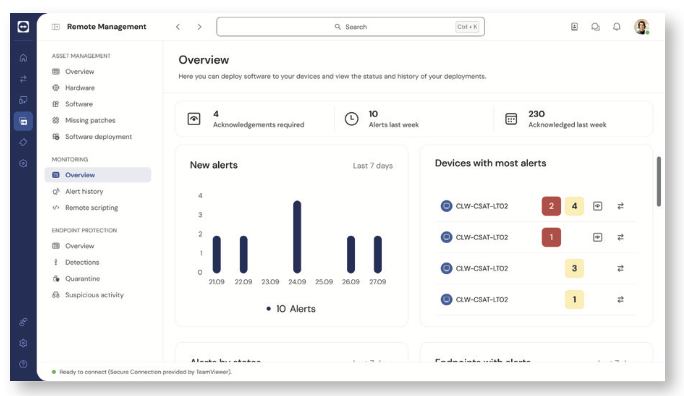
- Integrations. TeamViewer Remote also offers enhanced integration with TeamViewer’s wider product portfolio including its remote monitoring and management (RMM) tool. “While the RMM product was perceived by many customers as fairly separate to our TeamViewer remote control and access tool, we’ve been merging these products under the hood of TeamViewer Remote, so with a commercial user licence, you can experience these products in the same space,” explained Dr Witt.
“There’s not a dedicated tab that says remote monitoring and management. Instead, it is interlinked with all the processes that already exist in TeamViewer Remote. In the device section, for example, you can now directly access remote management. That includes capabilities for device monitoring and asset management; you can deploy software and configure it; and, last but not least, there are capabilities around patch management, which we provide through third party partners but also with our own capabilities.”
Another example is the MCO management console, which allows
users to configure different aspects of TeamViewer. Previously, this couldn’t
be used from within the downloaded desktop client and had to be accessed via a browser. Now, it has been baked into the TeamViewer Remote experience. “It’s way more integrated now, smoother, with no media breaks and no system breaks between different elements,” said Dr Witt.
TeamViewer Remote is available for download now. All existing users of the remote access and support solution can choose to upgrade their existing installation to TeamViewer Remote for free or log into the web client with their existing TeamViewer credentials.


Be First to Comment